Documenting my security practices
Soon enough I'll be releasing JDHQ v26 which will allow you – if you so choose – to store your own data. Think textual data: notes, the titles of IDs and categories, that sort of thing.1 (I have no plans to build a file storage service.)
But data is data. Even the title of an ID you create is potentially sensitive: it might relate to a medical procedure, for example.
It would be disastrous to leak or otherwise allow this data to be exposed. There's the obvious moral motivation, but also an economic one: nobody's going to pay to use an insecure platform!
I'm particularly sensitive to security issues given last month's leak of email addresses. So here's an in-depth look at my security practices. In the hope of making it readable by the layperson, I'll give background where necessary. I welcome feedback.
Background: secret keys
My site uses a number of third-party services. Of particular interest are Clerk, which handles authentication, and Supabase, where your data is stored.
Use of third parties like this is not only normal, it's encouraged. Authentication in particular is notoriously difficult: it's the sort of thing I really shouldn't do myself. It's very likely that I'd do it wrong and introduce a security hole. Far better to use a company whose entire focus is authentication. So you should see this use of third parties as 'a feature, not a bug'.2
My site runs on Netlify and for Netlify to talk to Clerk or Supabase, it needs my 'secret key' from those services. This is just a very long password that servers use to talk to each other. But there's a clue in its name: secret. If you have my Clerk or Supabase secret key, you can do anything that I can do.
We'll come back to these secret keys.
My logins to these sites
If you could sign in to these sites as me, that'd be bad. You could generate new secret keys, for example.
All of my logins use unique email addresses at a never-published domain (i.e. not …@johnnydecimal.com), unique strong passwords generated by 1Password, and 2-factor authentication.3
Background: encryption
If I didn't encrypt your data, I'd be able to trivially – and accidentally – read it. Here's what the Supabase console looks like.
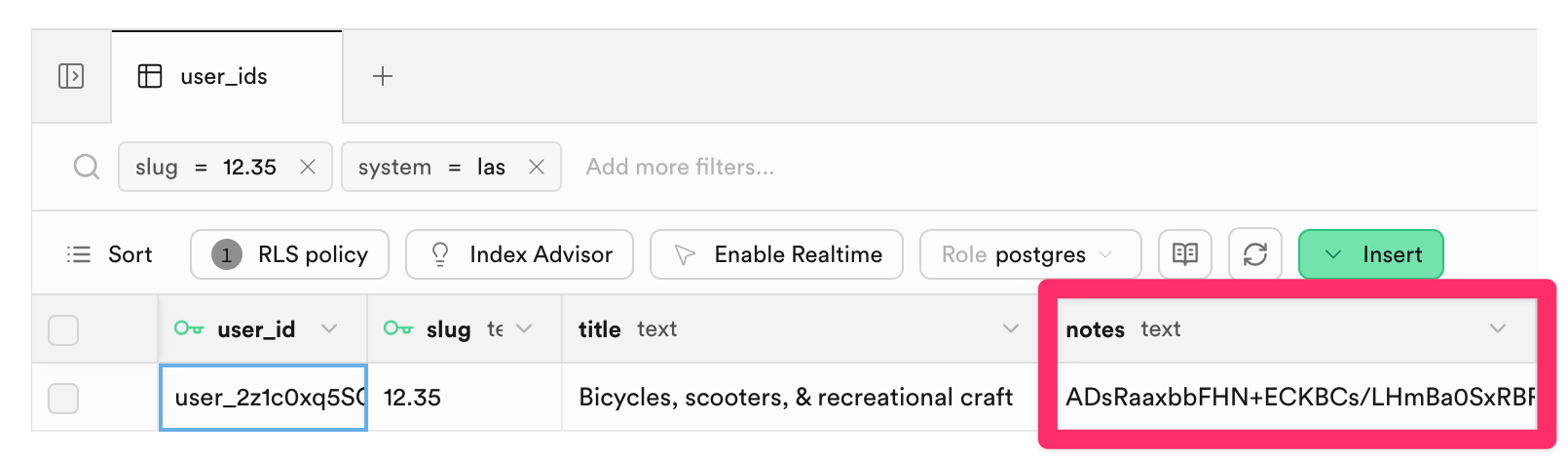
I've highlighted the 'notes' field. If that wasn't encrypted, any notes you entered would just appear there. Similarly for the title of your custom ID in the column to the left.4
Encryption is a balancing act. Broadly, there are two options.
- I encrypt it with a key that I hold. I can decrypt it.
- I encrypt it with a key that you hold. I can't decrypt it.
You might think option 2. is the obvious choice, but it comes with a serious drawback: if you lose the key, there's nothing I can do to help you decrypt your data. It's irretrievably lost. And overall it's just a more complex solution with more moving parts; more to go wrong.
For this reason, the vast majority of services that you use hold a key to your data. Apple has a key that will unlock your iCloud account: otherwise when you drop your phone in the ocean and realise you've also forgotten your iCloud password, all your family photos are gone. (This happens all the time.)5
The data encryption key
This encryption key is basically another secret key: a very long 'password'. I'll explain below how I ensure the safety of these keys.
The data encryption algorithm
I use AES-256-GCM. AES-256 is the gold standard for symmetric encryption. The 'GCM' part adds authentication: not only is your data unreadable without the key, but any tampering with the 'ciphertext' (the encrypted end result) is detected. If someone were to modify your encrypted data in the database, the system would reject it rather than silently returning garbage.
Each time a piece of data is encrypted, a random value is mixed in. This means that even if two users enter identical notes, the encrypted result is completely different each time – an attacker looking at the database can't even tell which entries contain the same text.
Your name isn't stored alongside your data
Note the user_id field in that screenshot. This id, which is a very long random string like user_39FY886j223z4M3jAib2ZRwcM3H, is how your data, in Supabase, is linked to your user, at Clerk.
So in order to steal your data and link it to your identity, an attacker would need to:
- Steal the Supabase database.
- Steal the encryption key, to decrypt the data.
- Access my Clerk account, to link the stolen data to an individual.
This assumes that I even have your name. You can save it in your JDHQ profile, but it's optional. I encourage the use of email aliasing for further anonymity.6
You need to trust me
This whole thing implies a level of trust. Just like you trust Apple not to go rummaging about in your iCloud account, you need to trust me to not decrypt your data just because I'm curious. To make it explicit: I won't do that. That'd be creepy and, again, business-ruining if discovered. What would I possibly stand to gain?
I am subject to the laws of Australia
Like every other service you use, I am subject to the law. Holding a key to your data means that, if legally compelled to reveal it, I am able to do so. This is just something to be aware of.7
'Advanced data protection' in the future
I would like to add an ADP-like feature – where you supply your own encryption key – in the future. Given the nature of my site and the data stored on it, it's honestly not high on my list of priorities.
Implementation details
The TL;DR of the background story so far is that:
- I hold a number of keys that are vital for the running of the service.
- These keys are critically sensitive. If leaked, stolen, or lost: game over.
Here's how I protect those keys.
Loading them into consoles
There is a one-time action which is to:
- Retrieve the secret key from its service, e.g. Clerk, or
- Generate a secret key, e.g. for data encryption, then
- Load that secret key into the consuming service, e.g. Netlify.8
It is in my interests to make these keys as difficult to access as possible. Fortunately, after this one-time load, I never need to access them. I'd only need them if, say, I moved from Netlify to another host.
I also need to not lose them
This is another trade-off. While keeping these keys very secure, I need to ensure that I don't lose them. While I can regenerate Clerk's secret key, this isn't an option for the key that encrypts your data. If I lose that key, I lose the ability to decrypt your data: also disastrous.
1Password
It is standard practice to store keys in a password manager. 1Password is one such tool. I've used it for my own passwords – which are all unique – since 2009. It provides dedicated features for developers.
Production keys
Production keys – those that are used to secure your data – are stored in a dedicated 1Password vault. Given that I do not routinely use these keys, I have removed my user account's 'read' access from this vault.
This causes the vault to un-synchronise from the desktop application. As a result, these keys are no longer available on this laptop.
This prevents even the most nefarious process from accessing them. Even if I were tricked into unlocking my vault: the keys simply aren't there to read.
To re-synchronise the vault to this laptop I need to sign in to the 1Password web console and add 'read' access back to my account. This would be a very deliberate action and certainly not one that a nefarious script could perform.
Development keys
This gets a bit technical.
My development keys – which I need to have available to me on this laptop, but which are not used to secure your data – are stored in a vault that is synchronised to this laptop. I have created a service account that only has access to this vault.
These keys are made available to my development environment using secret references in my .env file.9 For example:
CLERK_SECRET_KEY="op://<vault-name>/<item-name>/CLERK_SECRET_KEY"
Because my 1Password service account token is available to my environment, development key requests do not trigger a fingerprint authentication request.
This prevents 'fingerprint fatigue'. Previously, every key request triggered 1Password's authentication pop-up. It was natural to instinctively respond to these requests and would have been easy, therefore, to over-respond and accidentally approve a nefarious request.
Now, if a nefarious actor somehow triggers an op read request, 1Password will prompt me. This prompt will be unexpected and unusual; I will not instinctively reach for the fingerprint sensor. Not that it matters: because, as noted above, production keys aren't even here. There's nothing to steal.
This layered approach protects against supply-chain attacks like this one from 2025.
Key rotation
'Rotation' is the practice of proactively getting new secret keys and re-loading them into consoles. It's standard at large companies where many people might have access to a key: it limits the exposure if you forget to remove someone's access after they leave, for example.
I have no plans to routinely rotate my keys. For an individual with the controls described above it adds operational risk without any meaningful benefit. When am I most likely to accidentally leak a key? When I'm handling keys. So the less I do that, the less the risk.
Trufflehog
I have installed Trufflehog as a GitHub action. This software 'sniffs out' any secrets that are accidentally committed and pushed to GitHub (i.e. a worse version of what I did with those email addresses).
Every push to JDHQ is scanned by Trufflehog.
Package updates
Modern websites use any number of third-party software packages, and those packages are a source of security vulnerabilities. It is important to keep them up-to-date.
I have a monthly checklist to update all packages. I protect against malicious updates using pnpm's minimum-release-age and blocking of post-install scripts. This means that a package can't be installed until at least one week after its release, giving the community time to discover and flag compromised versions.
Phishing
You can have the best key security in the world, but if an attacker tricks you into handing them over – by setting up a fake site, and luring you into entering them there – it's game over.
That's what a phishing attack is. They can be extraordinarily sophisticated, and even the best security researchers in the world are susceptible. Here's how I guard against them.
1Password, again
Using a password manager, and only ever using it to fill your passwords – never entering them manually – is the simplest way to avoid having your credentials phished.
Because 1Password knows that my Clerk password only belongs at https://clerk.com. When a phisher tries to get me to sign in at https://сlerk.com – look carefully, see if you can spot the scam – 1Password will refuse to enter my password.
Passkeys are an even stronger defence against this, and I use them for all of my sensitive services.
Browser behaviour
Behaviourally, I have another line of defence. In this video I show how I have my common sites permanently set up in Safari tab groups.
So if someone mailed me a link to sign in to Clerk, I wouldn't click that link. That would open a new tab in a new window, which would break my neat system. Instead, I already have an open tab for Clerk, in my ⚙️ Services group. I'd head over there and look for a notification.
Disclosure and feedback
If I ever discover a security issue I will disclose it within 24 hours on the blog. Posts appear in my RSS feed, and I cross-post to the forum, Discord, and Mastodon.
Security.txt
I welcome security feedback and publish a security.txt.10
Summary
I'm very, very comfortable with my security posture. I've written it up here for a few reasons. It forced me to consider the end-to-end approach. I hope it gives you confidence. I hope you learned something. And I hope that other solo developers might find these patterns useful.
As always, I am happy to answer questions directly by email or on the forum or Discord.
Thanks
Versions of this post were kindly reviewed by two 'friends of Johnny.Decimal' who work in the field of IT security. Thank you. Any errors or omissions are, of course, my responsibility.
100% human. 0% AI. Always.
Footnotes
-
This will be a very early beta-style release. I expect almost nobody will use it. But the only way for me to get this thing from no-product to useful-product is to build it, and start using it. So that's what I'm gonna do. ↩
-
A phrase that nerds use to mean something that's working as designed. ↩
-
I implement Passkeys where available, otherwise using one-time codes managed by 1Password. I don't use SMS authentication.
I own a YubiKey but given my physical situation – travelling the world, always on the move – the risk of losing it outweighs any benefit I feel it would give. ↩
-
This ID is one of the base set from Life Admin and as such its title doesn't need to be encrypted. ↩
-
Apple offers Advanced Data Protection for those who want to opt-out of this key recovery. Most people shouldn't use it. ↩
-
I'll be recording a free course with Lucy later in the year to explain how this works, and how to set it up yourself. ↩
-
I'll implement a warrant canary before the new site goes live. ↩
-
Netlify recognises these keys as secrets and provides dedicated features to ensure their safety. ↩
-
.envis.gitignored, preventing exposure of even the 1Password secret reference string. ↩