/ › Documentation Docs › Working at the command line
    Sign in

    On this page

    • Working at the command line
      • The terminal loves structure
      • Script your way around
      • Sharing tips

    Community

    • Forum
    • Discord

    Further reading

    • AC.ID notation
    • JDex: Two other methods
    • Managing email
    • Naming files and subfolders
    • Subfolder patterns
    • The standard zeros
    • Using the Inbox and Archive
    • Working at the command line

    Pre-built systems

    We spent hundreds of hours designing them so you don't have to.

    • Life Admin System
    • Small Business System

    Working at the command line

    The terminal loves structure

    The structure of the Johnny.Decimal numbering scheme lets you move to any folder with the minimum number of keystrokes using tab completion.

    At each level, you know that there will be no conflicting items.
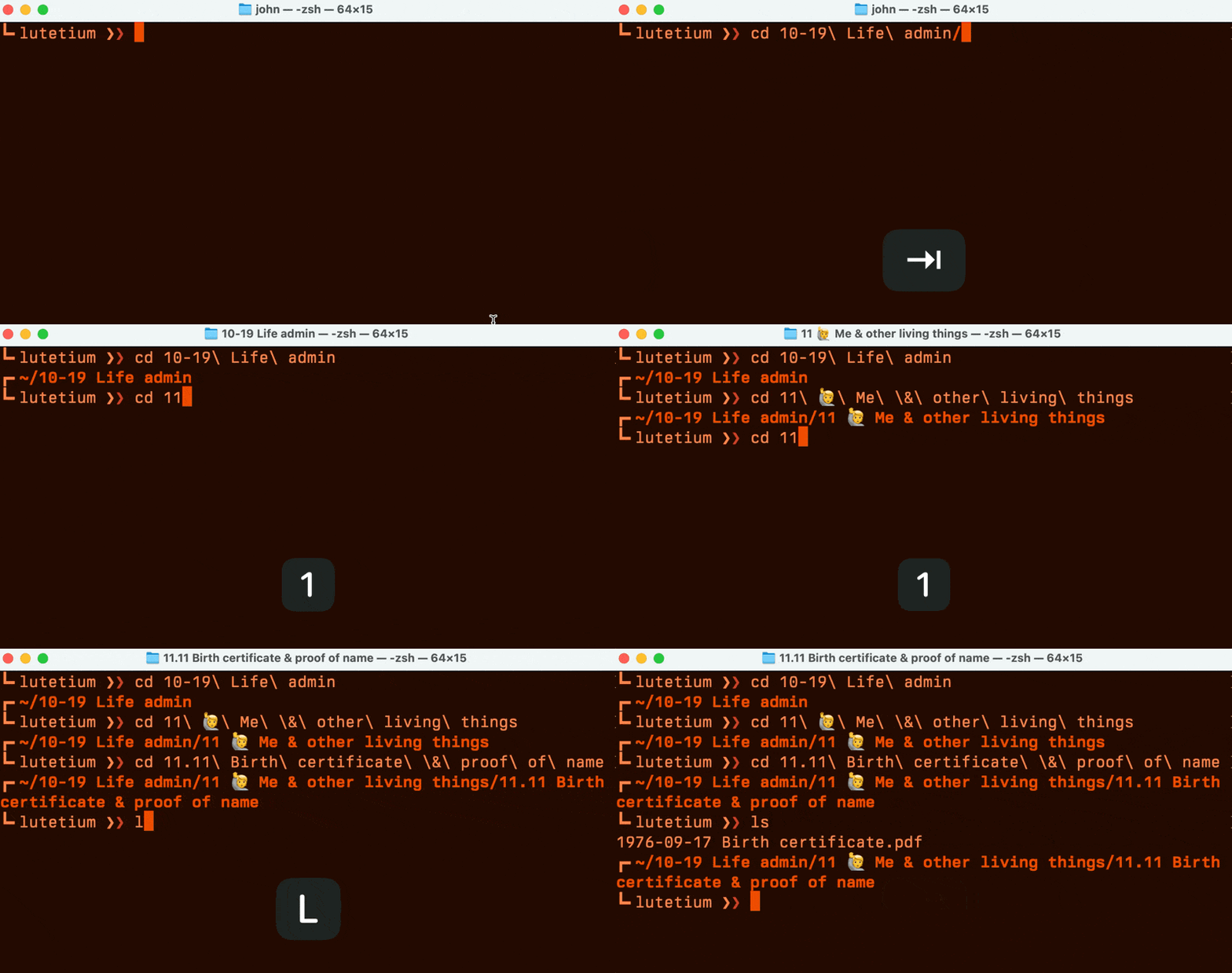
    A GIF, showing me navigating to subfolders in Terminal. At each stage I only need to enter the first part of the JD number then press Tab.
    Figure 62.22A. Tab completion in Terminal.

    Script your way around

    Easier still, use a simple bash script to change to any directory immediately. Put the script below in your .zshrc or equivalent. Then switch to any directory with cdj 11.11.


        cdj() {                                      
          # Update with your document root folder    
          pushd ~/Documents/*/*/1*                
        }                                            
                                                 
        export cdj                                   
                                                 
                                                 
    Figure 62.22B. Change directory with this bash script.

    Sharing tips

    Keep an eye on the forum and Discord, other Decimals often share their command line tips. We'd love to see yours.


    ◀ Back Using the Inbox and Arc… System expansion: Intro… Next ▶ (Use the ← arrow keys →)

    Written by humans • Search • Support