JDex: Two other methods
Earlier, we saw the preferred method to store your JDex. Here are two more ways and there are countless other possibilities.
One note, one line per entry
Rather than multiple notes, create a single note (or text file or document or spreadsheet or whatever).
The note's contents are your index – each line is an entry. Name it 00.00 Index so that it sits at the top of your system.
This style of index is more suitable if you want to programmatically query your system. It does work as a manual index but I found it more cumbersome.
Advantages
- Computer-readable, especially if you're exact with your formatting. I provide a formal structure here.1
- If you store this somewhere that allows collaborative editing – like Google Docs or Microsoft 365 – it's easily shared with the team.
- If you're really adept at moving around large text files this approach may have benefits. (So if I tell you I'm writing this in Vim and you know what that means, this might be for you.)
- Not dependent on any particular notes app. Anything that reads text will work.
- Your entire Johnny.Decimal system is visible 'at-a-glance', so it's easy to understand its structure.
Disadvantages
- I find the 'individual notes' method easier to search. But perhaps that's just what I'm used to.
- Can become unwieldy with a large index.
- Less friendly for the beginner.
- Doesn't integrate your notes into the index.
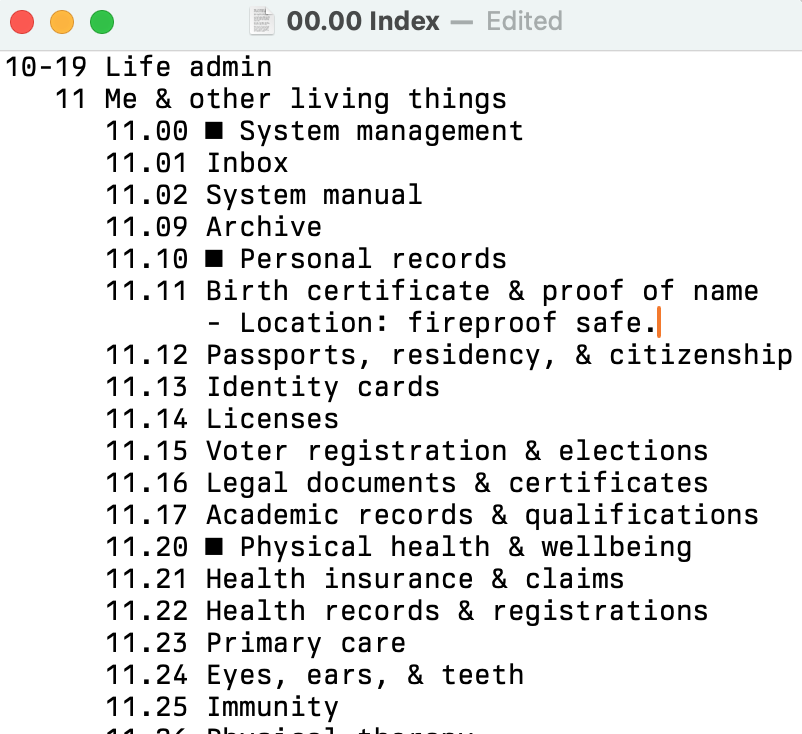
What this looks like in plain text
A fixed-width font in a text editor helps the structure be more obvious.
A database
You can also use an actual database. Each of your IDs is a database record with associated data. Databases are well suited to this task, but you have to know how to set up and maintain them.
Advantages
- Database columns can track metadata related to each index item.
- You could program an interface to allow easier creation of, and searching of, your index entries.
- You can query your database using any other program via its API.
- A shareable option for collaborating with colleagues.
Disadvantages
- Not quite as immediate and easy in daily use. (Unless you build some sort of hotkey-activated front end, if so call me immediately.)
- Now you're a database administrator.
Airtable
Airtable is a great SaaS database.2 I've created a template that you can use as a starter. Click the 'Copy base' button in the menu bar to add it to your account. I don't currently use this so it may need some work.
SharePoint lists
If you're at work, you might have access to SharePoint. It comes with a database feature: just create a list. They work fairly well and are shared by default.
Anything else?
After reading this you might come up with another method. As long as it meets your needs, that's great. If it's interesting, let me know.
Footnotes
-
It makes sense for the content to be consistently formatted, especially if you want to query it programmatically. This is the formal specification for the Johnny.Decimal index file (work in progress.) ↩
-
That link earns me a $10 referral credit if you sign up. If you'd rather not do that, that's cool. Just go to airtable.com. You can still copy the template. ↩